Neobanks · PDF to Excel, CSV, QBO, OFX, Xero
Convert Revolut statements to Excel, CSV or QBO
BetaBeta: built from the bank's published layout
Revolut makes a separate statement for each currency. The converter keeps every currency on its own and checks it against its own balances. Download Excel, CSV, QBO, OFX, Xero CSV or QuickBooks Online CSV; the PDF never leaves your device. Beta: tested on synthetic replicas of the Revolut layout, not yet on real statements. Wrong row? Click "This row is wrong".
Revolut statement at a glance
- Country
- Neobanks
- Statement columns
- Date · Description · Debit · Credit · Balance
- Date format
- MMM D, YYYY, D MMM YYYY
- Number format
- 1,234.56
- Currency
- Read from the statement, one section per currency
- Balance check
- Running balance on every row, then the closing balance
- Export formats
- Excel (XLSX) · CSV · QBO (Web Connect) · OFX · Xero CSV · QuickBooks Online CSV
- CSV from the bank
- Available
Revolut statement layout
What the statement shows
- Personal account statements are generated separately for each currency account.
- The statement contains the account holder name and address, BIC and IBAN details, a balance summary and the list of transactions.
- Personal statements can be downloaded as PDF or Excel for a chosen timeframe.
- Business account statements are also produced per currency account and list PDF, CSV and CAMT.053 XML formats (MT940 on some pages).
- Public descriptions say statements use transaction rows with separate Money out and Money in columns with a running Balance and a short date such as 'Jan 5, 2024' (assumed; not confirmed on an official page).
How the converter reads it
Revolut produces a separate statement for each currency account. If you hold pounds, euros and dollars, a full picture of your money means three statements, one per currency. Revolut describes each personal statement as containing your name and address, the BIC and IBAN details, a balance summary and the list of transactions.
More detail
You can choose PDF or Excel when you download a personal statement. In the app, open the currency under Accounts on the Home screen, tap Statement, pick the timeframe and the format, and generate and share the file. On the web the steps are similar: open Accounts, pick the currency account, choose Statements, select the timeframe and file type, and download. Repeat for each currency. Business accounts have statements per currency account as well, and Revolut lists PDF, CSV and CAMT.053 XML formats for them, with MT940 mentioned on some pages.
Since Revolut can give you Excel or CSV directly, the converter matters mainly when the PDF is the only copy you have. That happens more often than you might think. A PDF is what lenders and letting agents ask for, so it is often the file that gets saved, emailed and archived, while the spreadsheet version is never downloaded.
When a PDF contains more than one currency block, the converter reads each block on its own. Every currency keeps its own opening balance, its own closing balance and its own balance check, and there is no conversion between currencies. Euro rows stay in euros, dollar rows in dollars. If you are importing into QuickBooks or Xero, the cleanest approach is one bank account per currency in your ledger and one converted file per currency to go with it.
The details of the transaction table are the least certain part of this page. The converter expects separate Money out and Money in columns, a running Balance column and short dates such as Jan 5, 2024. These come from public descriptions and are not confirmed on an official Revolut page. If your statement looks different, for example with a single signed amount column or another date style, the balance check is where a mismatch will show.
Within the assumed layout, the converter takes the direction of a payment from its column. Money out becomes a negative amount, Money in a positive one. Each row's balance can be checked against the previous row, as well as against the closing balance of the block. Descriptions that wrap onto a second line, such as a reference under a transfer, are joined back into the description of their row.
Revolut is marked Beta here. The test replica was built from public descriptions and an assumed layout, not from a real Revolut statement, so it stays Beta until real files confirm or correct it. Scanned or photographed statements are not supported.
After the balance check passes, download Excel or CSV, or produce a QBO, OFX or Xero CSV file for each currency.
Sources: the bank's help pages and public descriptions of sample statements.
How to download your statement from Revolut
On the website
- Open Accounts and pick the currency account.
- Choose Statements.
- Select the timeframe and the file type (PDF or Excel).
- Download the file; repeat for each currency.
In the mobile app
- On Home, open the currency under Accounts.
- Tap Statement.
- Pick the timeframe and PDF or Excel, then generate and share the file.
Steps checked: November 1, 2026. The bank also offers a CSV export. Revolut exports Excel (personal) and CSV (business) itself, one file per currency. Use the PDF converter when only the PDF is available.
Sample preview and test results
Synthetic sample, not a real statement. Open the synthetic sample PDF
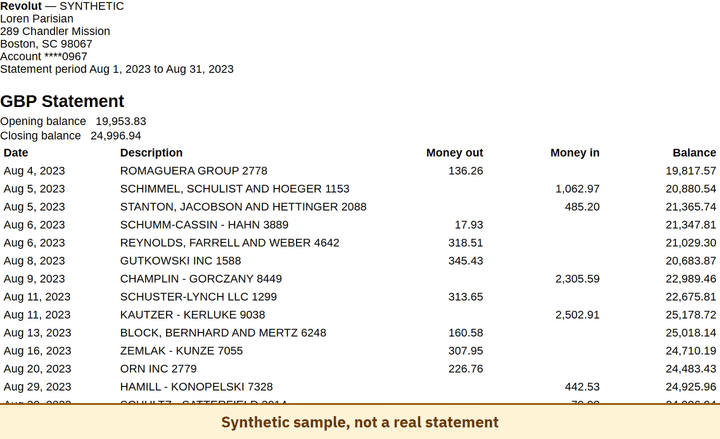
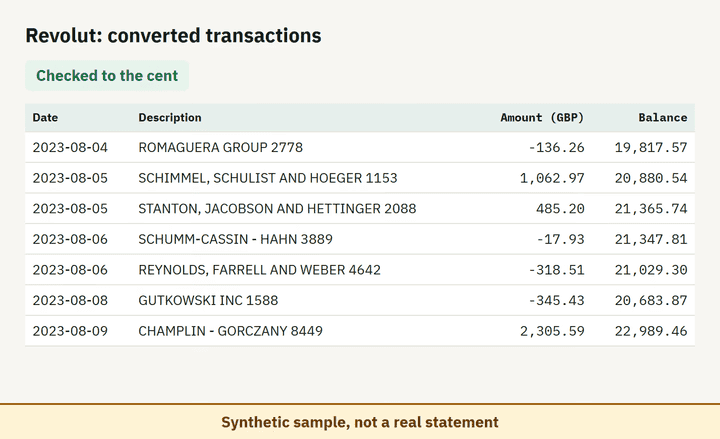
- Balance check passed on 100% of 8 perturbed synthetic files.
Which file to download from a Revolut statement
| Format | Imports into | Status |
|---|---|---|
| Excel (XLSX) | Microsoft Excel, Google Sheets, LibreOffice Calc, Apple Numbers | Available |
| CSV | Excel, Google Sheets, databases and scripts, most accounting tools that accept a custom CSV | Available |
| QBO (Web Connect) | QuickBooks Online (bank upload) | Available, follows the Intuit Web Connect specification |
| OFX | Xero, GnuCash, Moneydance, Banktivity, MoneyMoney, QuickBooks Online (bank upload) | Available, follows the OFX 2.2 specification |
| Xero CSV | Xero (Import a statement) | Available, follows the Xero CSV template |
| QuickBooks Online CSV | QuickBooks Online (Upload transactions) | Available, follows the QuickBooks Online 3-column layout |
Known limitations
- Beta: tested on synthetic replicas built from public Revolut layout information, not yet on real statements. If the result looks wrong, mark the row with 'This row is wrong' or use 'Send page layout', which sends the masked layout only and none of your figures.
- Column names (Money out / Money in) and the 'MMM D, YYYY' date are not confirmed on an official page; the real layout may differ.
- Each currency block is read on its own; there is no conversion between currencies.
Revolut statement FAQ
Can I convert a Revolut PDF statement to Excel or CSV?
Yes. Drop the PDF into the converter on this page and it reads each currency block, checks the opening and closing balance, and exports XLSX or CSV. Revolut can also export Excel itself.
Why is there a separate statement for each Revolut currency?
Revolut generates statements per currency account, so a multi-currency user downloads one file per currency. The converter keeps each currency as its own section.
Which format imports best into QuickBooks or Xero?
Convert the statement to QBO or the Xero CSV format and import one file per currency into the matching bank account.
What does a Revolut statement contain?
Your name and address, the BIC and IBAN details, a balance summary and the list of transactions for one currency account.
Can I just use ChatGPT to convert my Revolut statement?
For a short statement, if you check the totals yourself. Here every Revolut row is checked against the statement balances for you. Converter or ChatGPT? See our comparison.
Test status
Last tested: November 2, 2026