United States · PDF to Excel, CSV, QBO, OFX, Xero
Convert Bank of America statements to Excel, CSV or QBO
BetaBeta: built from the bank's published layout
Bank of America splits each statement into sections with subtotals. The converter keeps the sign of every row and checks the result against the ending balance. Download Excel, CSV, QBO, OFX, Xero CSV or QuickBooks Online CSV; the PDF never leaves your device. Beta: tested on synthetic replicas of the Bank of America layout, not yet on real statements. Wrong row? Click "This row is wrong".
Bank of America statement at a glance
- Country
- United States
- Statement columns
- Date · Reference · Description · Amount
- Date format
- MM/DD/YY
- Number format
- 1,234.56
- Currency
- USD
- Balance check
- Opening balance + rows = closing balance
- Export formats
- Excel (XLSX) · CSV · QBO (Web Connect) · OFX · Xero CSV · QuickBooks Online CSV
- CSV from the bank
- Available
Bank of America statement layout
What the statement shows
- Public descriptions say checking statements open with an account summary: beginning balance, the totals for deposits and other additions, withdrawals and other subtractions, checks and service fees, then the ending balance.
- Public descriptions say statements split transactions into sections named Deposits and other additions, Withdrawals and other subtractions, Checks and Service fees, each with its own subtotal; the sign of a row follows its section.
- As described publicly, the statement ends with a Daily ledger balances table of date and balance pairs; these are balances, not transactions, and carry no description.
- In the layout described publicly, rows have no per-row running balance, so a statement reconciles as beginning balance plus the sum of all sections equals ending balance.
- Bank of America publishes a 'How to read your statement' guide that describes the account summary and notes that the ending balance already reflects service fees. The PDF is old (about 2013) and section names may have changed.
How the converter reads it
A Bank of America checking statement is built around its account summary. Near the top you will find the beginning balance, then totals for deposits and other additions, for withdrawals and other subtractions, for checks and for service fees, and finally the ending balance. Bank of America's own "How to read your statement" guide describes this summary and notes that the ending balance already reflects service fees. That guide dates from around 2013, so some section names on a current statement may read a little differently.
More detail
- Bank of America publishes a statement reconciliation worksheet that compares the statement ending balance with the account register.
Below the summary, transactions are not in one long table. Each kind of activity has its own section with its own subtotal: Deposits and other additions, Withdrawals and other subtractions, Checks, and Service fees. The amounts are printed as plain figures, and what tells you whether money came in or went out is the heading the row sits under. When the converter reads the statement it remembers which section it is in, so a payroll deposit lands in the export as a positive number and a card payment, a paid check or a monthly fee lands as a negative one.
There is no running balance next to each row. That changes how a conversion can be checked. With a per-row balance you could test every line against the previous one. Here the test is done on the whole statement: the beginning balance plus everything in the addition sections, minus everything in the subtraction sections, should equal the ending balance. If one row is missed or read with the wrong sign, the total stops matching, and the converter reports the gap before you export. Bank of America publishes its own reconciliation worksheet for comparing the statement ending balance with your register, and the same arithmetic is what the converter runs.
At the end of the statement there is usually a Daily ledger balances table, a list of dates paired with end-of-day balances. These lines look a bit like transactions, but they have no description and they are not money moving. The converter leaves them out of the export so you do not end up with phantom rows or doubled totals in your spreadsheet.
Service fees deserve a word of their own. Because they sit in a separate section, it is easy to overlook them when copying a statement by hand. In the export they appear as ordinary debit rows, which is what your bookkeeping software expects.
Bank of America is shown as Beta here. The layout notes come from the bank's older reading guide, its reconciliation worksheet and third-party descriptions, and support for it has been tested on synthetic replicas rather than on real customer statements. The official guide PDF could not be read as text, so details such as the MM/DD/YY date format are not confirmed by Bank of America itself. Credit card statements, business accounts and statements that cover several months use different layouts and are not covered for now.
Online Banking can give you recent activity as a download, but older months are kept only as PDF statements. If you need a full tax year, a loan file or a year of history for an accountant, converting the monthly PDFs is often the only route to a single workbook.
Sources: the bank's help pages and public descriptions of sample statements.
How to download your statement from Bank of America
On the website
- Sign in to Online Banking at bankofamerica.com.
- Open the account and choose Statements & Documents.
- Pick the statement month and use Download or Print to save the PDF.
In the mobile app
- Open the Bank of America Mobile Banking app and select the account.
- Tap Statements & Documents and choose the month.
- Save or share the PDF.
Steps checked: November 1, 2026. The bank also offers a CSV export. Online Banking offers a transaction download (CSV/Excel) for recent activity; older months exist only as PDF statements.
Sample preview and test results
Synthetic sample, not a real statement. Open the synthetic sample PDF
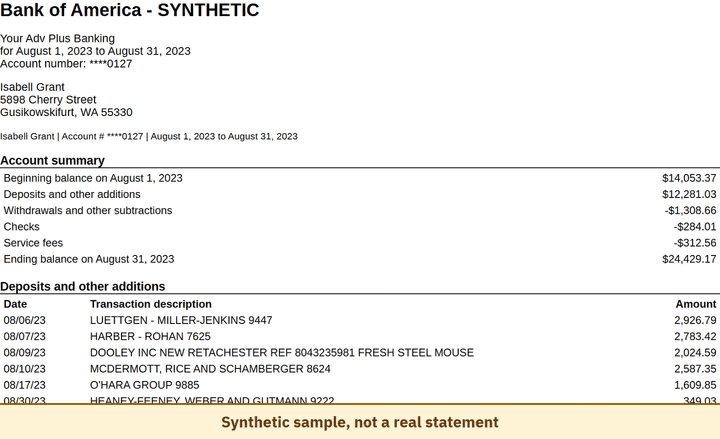
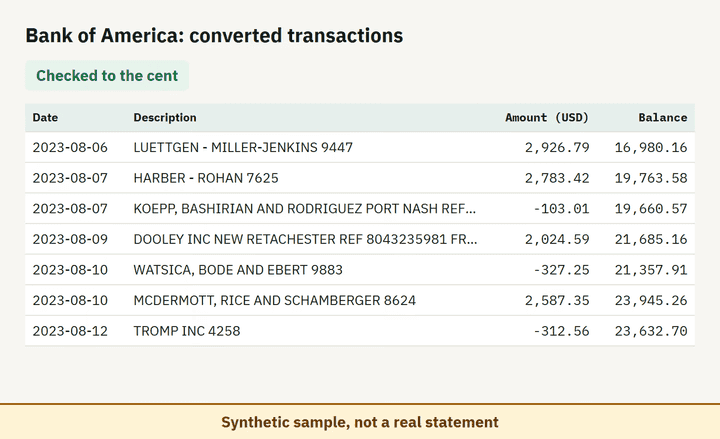
- Balance check passed on 100% of 8 perturbed synthetic files.
Which file to download from a Bank of America statement
| Format | Imports into | Status |
|---|---|---|
| Excel (XLSX) | Microsoft Excel, Google Sheets, LibreOffice Calc, Apple Numbers | Available |
| CSV | Excel, Google Sheets, databases and scripts, most accounting tools that accept a custom CSV | Available |
| QBO (Web Connect) | QuickBooks Online (bank upload) | Available, follows the Intuit Web Connect specification |
| OFX | Xero, GnuCash, Moneydance, Banktivity, MoneyMoney, QuickBooks Online (bank upload) | Available, follows the OFX 2.2 specification |
| Xero CSV | Xero (Import a statement) | Available, follows the Xero CSV template |
| QuickBooks Online CSV | QuickBooks Online (Upload transactions) | Available, follows the QuickBooks Online 3-column layout |
Known limitations
- Column layout and date format (MM/DD/YY) come from third-party descriptions; the official guide PDF could not be read as text, so no official page confirms them.
- Beta: tested on synthetic replicas built from public Bank of America layout information, not yet on real statements. If the result looks wrong, mark the row with 'This row is wrong' or use 'Send page layout', which sends the masked layout only and none of your figures.
- Credit card, business and multi-month statements use other layouts and are not covered.
Bank of America statement FAQ
Why do Bank of America statement rows have no balance?
Transactions are listed by section without a running balance; balances appear in the summary and the Daily ledger balances table.
How is a deposit told apart from a withdrawal?
By the section: Deposits and other additions add; Withdrawals and other subtractions, Checks and Service fees subtract.
What are Daily ledger balances?
A table of end-of-day balances. They are not transactions and are skipped in the export.
Do service fees appear in the export?
Yes. Service fees are their own section and are exported as debits.
Can I just use ChatGPT to convert my Bank of America statement?
For a short statement, if you check the totals yourself. Here every Bank of America row is checked against the statement balances for you. Converter or ChatGPT? See our comparison.
Test status
Last tested: November 2, 2026